
Guide shows how to remove and install a new miter gearbox on the Velocity.
Scan to Read on Device:

removal
Power machine on but DO NOT HOME AXES. Remove plastic cover from top of gearbox and manually move miter until miter motor collar allen head bolt rotates into view and is accessible to loosen with wrench.
Power down machine and turn off disconnect at the wall. Lock Out Tag Out.
Move bridge to 0 or 90 degrees and support in position safely and securely.
Remove top aluminum cover from machine and support bridge arms and drive shaft with straps/chains/overhead crane to prevent movement.
Disconnect encoder and power cables from miter motor.
Loosen mitre motor coupler through access hole from gearbox. Referenced in Step 1.

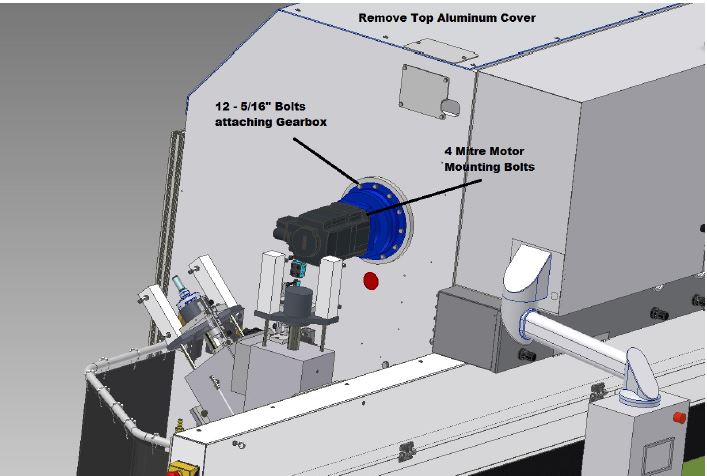
Remove miter motor by removing four mounting bolts from miter motor mounting flange. Motor may need to be wiggled to dislodge motor from gearbox.
Find dowel pin mark position with marker on driveshaft inside machine and then remove eleven 10mm bolts.
Remove 12 bolts 5/16” attaching gearbox to machine on outside of machine.
Remove silicone from 1/2” threaded pusher holes from inside machine and install four 1/2” bolts to push gearbox out and have second person assist on outside to support gearbox. Gearbox weighs around 80lbs.